blog.msbnet.co.uk2020-11-14T18:27:46+00:00Michael Bowenhttps://blog.msbnet.co.ukCloudflare adds Kompressor to it's engineering toolset...Michael Bowenhttps://blog.msbnet.co.uk/cloudflare-adds-kompressor-to-its-engineering-toolset/2020-11-14T18:25:22+00:00
...I can dream :)
Unfortunately, Cloudflare suffered an outage yesterday. Here's the blurb:
Today a configuration error in our backbone network caused an outage for Internet properties and Cloudflare services that lasted 27 minutes. We saw traffic drop by about 50% across our network. Because of the architecture of our backbone this outage didn’t affect the entire Cloudflare network and was localized to certain geographies.
Cloudflare went into some depth to describe the problem which was nice to see. The following snippet is from the router in question.
from {
    prefix-list 6-SITE-LOCAL;
}
then {
    local-preference 200;
    community add SITE-LOCAL-ROUTE;
    community add ATL01;
    community add NORTH-AMERICA;
    accept;
}
As there was backbone congestion in Atlanta, the team had decided to remove some of Atlanta’s backbone traffic. But instead of removing the Atlanta routes from the backbone, a one line change started leaking all BGP routes into the backbone. The correct change would have been to deactivate the term instead of the prefix-list.
We've all been there, I'm sure!
That moment you commit a BGP change and a sense of dread floods every part of your body as you realise you've just broken the internet. Sometimes, it's nice to have a way to check your work because even the most diligent engineers can make mistakes.
Kompressor is a project I've been working on that is designed to help busy network engineers, not replace them :)
You arrive at the office. The group calendar shows there are twenty services to migrate this week.
You've never logged in to these firewalls before. You've never seen the services that need to be migrated before. Each firewall is considered critical national infrastructure. Lives could be at stake.
There's at least two other engineers on your team. There is no work scheduling or queue. You've no idea who has started work on what.
After thumbing through the 200 page LLD for the information you need, you login to the first firewall.
You issue the command show system commit to find at least two other people have committed changes to this box today. You can see at least half of the change is present in the config but due to the length and complexity, it's not immediately obvious, from the CLI, whether this change has been successful.
You catch a glimpse of the time. It's lunchtime and you've achieved nothing.
]]>
The best tool for the job?Michael Bowenhttps://blog.msbnet.co.uk/the-best-tool-for-the-job/2020-11-14T18:26:37+00:00
For SRE, any manual, structurally mandated operational task is abhorrent.
As a contract network engineer, I tend to move around a bit. I get to work in lots of different places with lots of different people which is quite fun. Recently, I was asked to configure a few boxes (Juniper SRXs) for a service that was being migrated. In some places, the work changes day by day but occasionally, you start to see the same jobs come around which opens up the inevitable question... "Is there a better way?"
What's my definition of better? Minimum effective dose, as Tim Ferriss says.
Before heading straight to the Ansible (or similar CoolTooling of the moment) download page, it's worth remembering that I could be gone any day and some organisations take months (I tried to get TCPping added to the toolset whitelist in one such place...) to sign off new tooling. This is especially true in roles that demand Security Clearance. It's also worth remembering that junior engineers cut their teeth on jobs like this where visibility of the syntax is essential. To this end, the XML equivalent of the commit is not always desirable.
A rough outline of the service configuration, in this particular, instance was as follows:
# Set up the interface with the appropriate VLAN, IP address and subnet mask: set interfaces ge-0/0/4 vlan-tagging set interfaces ge-0/0/4 unit 333 vlan-id 333 set interfaces ge-0/0/4 unit 333 family inet address 10.33.33.1/29
# Add the interface to the relevant VRF: set routing-instances LOB interface ge-0/0/4.333
# Add the interface and prefix to the address book within the relevant zone: set security zones security-zone SERVICE1 address-book address SERVICE1NET 10.33.33.0/29 set security zones security-zone SERVICE1 interfaces ge-0/0/4.330
# Create the prefix list and the BGP community: set policy-options prefix-list SERVICE1NET 10.33.33.0/29 set policy-options community SERVICE1 members 65001:333
# Create the export policy to tag the community: set policy-options policy-statement Export_to_LOB term SERVICE1 from prefix-list SERVICE1NET set policy-options policy-statement Export_to_LOB term SERVICE1 then community add SERVICE1 set policy-options policy-statement Export_to_LOB term SERVICE1 then accept
# Create the security policy: set security policies from-zone SERVICE1 to-zone LOB policy SERVICE1_Access match source-address SERVICE1NET set security policies from-zone SERVICE1 to-zone LOB policy SERVICE1_Access match destination-address any set security policies from-zone SERVICE1 to-zone LOB policy SERVICE1_Access match application any set security policies from-zone SERVICE1 to-zone LOB policy SERVICE1_Access then permit set security policies from-zone SERVICE1 to-zone LOB policy SERVICE1_Access then log session-init
The same VLAN ID was used for this service at each site which means we have four variables we need to consider:
1. The base interface (ge-0/0/4) 2. The interface IP (10.33.33.1/29) 3. The address-book entry (10.33.33.0/29) 4. The prefix-list entry (10.33.33.0/29)
With the last two being identical, we'll only need to supply three arguments as the input to whichever script we create to generate a complete configuration to be pushed to the device. Part of me immediately wondered if I could just use the first two. It seemed possible the prefix-list entry might take 10.33.33.1/29 as input and automatically convert it to 10.33.33.0/29 for me:
{primary:node0}[edit]
root@msbnet_node0# set policy-options prefix-list SERVICE1NET 10.33.33.1/29
error: host portion is not zero (10.33.33.0/29): 10.33.33.1/29
Negative on that, Houston!
Fine! What about the address-book entry, though?
{primary:node0}[edit]
root@msbnet_node0# set security zones security-zone SERVICE1 address-book address SERVICE1NET 10.33.33.1/29

{primary:node0}[edit]
root@msbnet_node0# commit check
[edit security zones security-zone SERVICE1 address-book]
  'address SERVICE1NET'
    Invalid address entry
error: configuration check-out failed
That's a negative, too, it seems!
So I created a batch script which took those three essential arguments, swapped them into the variables in a template and then echoed the results to a file. That worked well enough for that day as I needed to get those services live ASAP but that night, I wondered how I might be able to get that down to just two arguments and have the script work out the network address itself. I had no idea how I was going to do this but I did have the vaguest recollection, from my CCNA days, bouncing around the back of my head...
Computers deduce their network address by performing a logical AND on the binary equivalent of the IP address.
So I started Googling 'logical AND' and then rummaging through StackOverflow and GitHub. Someone must have solved this problem before...?
After several minutes of ingesting a dizzying array of complex sounding terms, I decided to re-familiarise myself with the basics. From Wikipedia:
Logical conjunction is often used for bitwise operations, where 0 corresponds to false and 1 to true:
0 AND 0 = 0 0 AND 1 = 0 1 AND 0 = 0 1 AND 1 = 1
The AND of a set of operands/inputs is true if and only if ALL of it's operands are true.
It was at this point I realised I'd been googling the wrong thing. It seemed what I was actually trying to achieve was a 'bitwise AND'. It is the bitwise AND which takes a normal number (or tiny integer if you prefer), converts it to it's binary form and then performs a logical AND on it. This subtle difference cost me a good few hours!
A quick example for our use case:
An IP (IPv4) address is said to be a 32 bit address, written in 'dot decimal' notation. A better description might be that it's four lots of 8 bit addresses (octets) wedged together by a period/full stop: 10.33.33.1
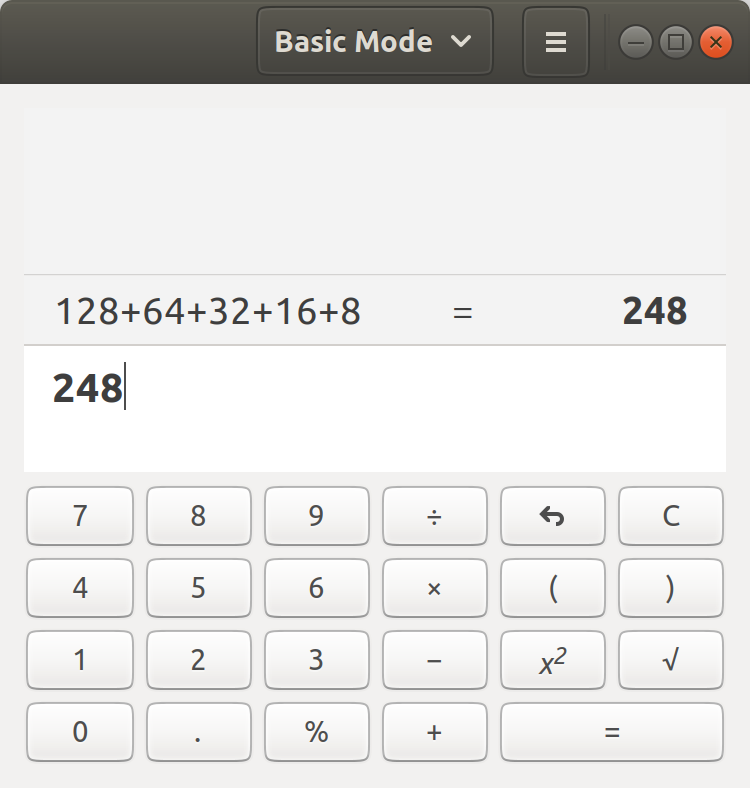
An 8 bit address simply means there are a maximum of 8 bits or place holders available to represent a number. imagine a table, with 8 fields, that are labelled like this:
128
64
32
16
8
4
2
1
You can place the digit one or zero in any field. The maximum value we can represent is 255. We would do this by placing the digit one in all eight columns. If we wanted to represent a number higher than 255, we'd need more bits. Going left, each additional field added would double the size of the one that preceded it.
Back to 8 bits. Let's work out, for example, my age in binary. I'm 37.
Starting from the leftmost bit, sometimes referred to as the most significant bit, navigate from left to right until you find a column where your age fits within either perfectly or with a remainder:
128 = no 64 = no 32 = yes, remainder 5!
128
64
32
16
8
4
2
1
1
We've now accounted for 32 out of the 37 total years. Where do we put the remaining 5?
16 = no 8 = no 4 = yes, remainder 1!
128
64
32
16
8
4
2
1
1
1
2 = no 1 = yes, perfect fit!
128
64
32
16
8
4
2
1
1
1
1
Put zeros in any remaining columns:
128
64
32
16
8
4
2
1
0
0
1
0
0
1
0
1
Now write out the set of zeros and ones and we have my age, in 8 bit binary: 00100101
Armed with this information, let's attempt to, manually, perform a bitwise AND on the IP address we've specified earlier against the subnet mask we also specified; 10.33.33.1/29.
Let's do the IP first. Take each octet in turn and convert it into the binary equivalent.
00001010.00100001.00100001.00000001 = 10.33.33.1
This leaves us with the subnet mask. Sometimes, the subnet mask will be written in the same format as the IP address - dot decimal - and sometimes it will be written in shorthand or 'CIDR' notation. /29 is an example of CIDR notation.
/29 simply means the first 29 bits of the subnet mask, from the most significant bit, are set to one. The remaining bits will be set to zero.
For prefixes longer than 24 bits (the overwhelming majority of all prefixes you're likely to configure on Customer Edge devices), the first three octets will always be 'maxed out'. This means we can skip to the last octet just like we did before. Let's set the first five bits of the last octet to one and see what value that gives us:
Now that we have the binary representation of both, we can attempt the logical AND. We do this by comparing the most significant bit of A with the most significant bit of B with the all or nothing mindset that epitomises a logical AND.
We'll put the result into C. If they're not both 1, the result is 0.
Why are we doing this again? We hope the result of performing a logical AND on A (IP address) and B (subnet mask) will yield the network/base address in C which will save us from having to manually work it out and submit it as a script argument for the next 100 potential sites. We'll use the & operator below to indicate we're performing a logical AND.
Result C: 00001010.00100001.00100001.00000000 (10.33.33.0) <------ As expected, the network address is zero in this instance. The theory holds!
Now, the actual work can begin. Let's remind ourselves of the desired outcome. I want to run a script and specify the absolute minimum number of arguments in order to generate the configuration for SERVICE1. Something like:
The quickest way forward now would be to create a first draft of sorts that simply accepts a prefix as input and then echoes the subsequent network address back to us.
@echo off
set ADDR="%1"
set C=255.255.255.
for /f "tokens=4 delims=./" %%a in (%ADDR%) do set OCTET4=%%a
for /f "tokens=1,2,3 delims=." %%x in (%ADDR%) do set OCTET123=%%x.%%y.%%z.
for /f "tokens=2 delims=/ " %%m in (%ADDR%) do set SLASH=%%m
set /a MASKOCTET4="255 - (255 >> (%SLASH%-24))"
set SUBNETMASK=%C%%MASKOCTET4%
set /a SUBN="%OCTET4% & %MASKOCTET4%"
echo.
echo NETWORK ADDRESS: %OCTET123%%SUBN%/%SLASH%
echo SUBNET MASK: %SUBNETMASK%
Save this file with a .bat extension (prefix.bat) and then call it from a command prompt:
So what exactly are we doing here? Essentially, we chop up the prefix into more usable chunks before re-assembling it and spitting it out at the end. We also perform a logical shift (where, using the table above, we simply fast forward over the bits) to calculate MASKOCTET4 using the CIDR notation from the prefix to calculate how many bits to shift right. Finally, we perform the bitwise AND on the fourth octet of the prefix vs the fourth octet of the calculated subnet mask.
The easiest way to see what's going on is to echo the variables out as we're setting / calculating them:
@echo off
echo.
set ADDR="%1"
set C=255.255.255.
for /f "tokens=4 delims=./" %%a in (%ADDR%) do set OCTET4=%%a
echo OCTET4:          %OCTET4%
for /f "tokens=1,2,3 delims=." %%x in (%ADDR%) do set OCTET123=%%x.%%y.%%z.
echo OCTET123:        %OCTET123%
for /f "tokens=2 delims=/ " %%m in (%ADDR%) do set SLASH=%%m
echo SLASH:           %SLASH%
set /a MASKOCTET4="255 - (255 >> (%SLASH%-24))"
echo MASKOCTET4:      %MASKOCTET4%
set SUBNETMASK=%C%%MASKOCTET4%
set /a SUBN="%OCTET4% & %MASKOCTET4%"
echo SUBN:            %SUBN%
echo.
echo NETWORK ADDRESS: %OCTET123%%SUBN%/%SLASH%
echo SUBNET MASK:     %SUBNETMASK%
Save this file with a .bat extension (prefix_debug.bat) and then call it from a command prompt and try a few prefixes:
A few minutes later, we have a script that takes just the two essential arguments and will run on any Windows box without installing any additional software. A far cry from full blown automation but infinitely more scalable than find and replace?
]]>
vSRX - your personal laptop firewall!Michael Bowenhttps://blog.msbnet.co.uk/vsrx-your-personal-laptop-firewall/2020-11-14T18:27:20+00:00
I love to lab.
One of the problems of running anything in a 'lab' environment, however, is that it can be a bit too clinical. Traffic generation can become a chore. Earlier this week, I was using Vagrant to spin up some vSRX labs on my laptop when it occurred to me that I could probably just gateway my native traffic through a VM.
There's probably a few ways to achieve this but here are the steps I followed:
Michael@schumacher:/vsrx$ vagrant status
Current machine states:

default                   running (virtualbox)

The VM is running. To stop this VM, you can run `vagrant halt` to
shut it down forcefully, or you can run `vagrant suspend` to simply
suspend the virtual machine. In either case, to restart it again,
simply run `vagrant up`.

Michael@schumacher:/vsrx$ vagrant ssh default
--- JUNOS 12.1X47-D15.4 built 2014-11-12 02:13:59 UTC
root@vsrx% cli
root@vsrx> show interfaces terse
Interface               Admin Link Proto    Local                 Remote
ge-0/0/0                up    up
ge-0/0/0.0              up    up   inet     10.0.2.15/24
gr-0/0/0                up    up
ip-0/0/0                up    up
lsq-0/0/0               up    up
lt-0/0/0                up    up
mt-0/0/0                up    up
sp-0/0/0                up    up
sp-0/0/0.0              up    up   inet
                                   inet6
sp-0/0/0.16383          up    up   inet     10.0.0.1            --> 10.0.0.16
                                            10.0.0.6            --> 0/0
                                            128.0.0.1           --> 128.0.1.16
                                            128.0.0.6           --> 0/0
dsc                     up    up
gre                     up    up
ipip                    up    up
irb                     up    up
lo0                     up    up
lo0.16384               up    up   inet     127.0.0.1           --> 0/0
lo0.16385               up    up   inet     10.0.0.1            --> 0/0
                                            10.0.0.16           --> 0/0
                                            128.0.0.1           --> 0/0
                                            128.0.0.4           --> 0/0
                                            128.0.1.16          --> 0/0
lo0.32768               up    up
lsi                     up    up
mtun                    up    up
pimd                    up    up
pime                    up    up
pp0                     up    up
ppd0                    up    up
ppe0                    up    up
st0                     up    up
tap                     up    up
vlan                    up    down

root@vsrx> exit

root@vsrx% exit
logout
Connection to 127.0.0.1 closed.

Michael@schumacher:/vsrx$ vagrant destroy -f
==> default: Forcing shutdown of VM...
==> default: Destroying VM and associated drives...
So that gets us a basic vSRX up and running.
Next, we'll need to define an inside (tap0) interface and an outside (wlan0) interface that we can bridge the VM to. Wireless access points tend to be picky about allowing foreign MACs through the front door so we'll allow the native adapter to authenticate to the AP but we'll remove the ability to initialise the IP stack, before gifting the native MAC to vSRX.
Next, let's replace the Vagrantfile. Don't forget to pop your MAC address in there:
Vagrant.configure(2) do |config|
  config.vm.box = "juniper/ffp-12.1X47-D15.4"
  config.vm.provider "virtualbox" do |vb|
    vb.memory = 512
    vb.cpus = 2
    vb.gui = false
  end

config.vm.define "vsrx" do |vsrx|
    vsrx.vm.host_name = "vSRX"
    vsrx.vm.network "public_network", auto_config: false, bridge: "wlan0", :mac => "a1b1c1d1e1f1"
    vsrx.vm.network "public_network", auto_config: false, bridge: "tap0"
    vsrx.vm.provision "file", source: "scripts/vsrx.sh", destination: "/tmp/vsrx.sh"
    vsrx.vm.provision :host_shell do |host_shell|
      host_shell.inline = 'vagrant ssh vsrx -c "/usr/sbin/cli -f /tmp/vsrx.sh"'
    end
  end
end
We'll also need to create a 'scripts' directory within the vsrx folder to hold the vsrx.sh file we've referenced above. Vagrant commandeers ge-0/0/0 for management, which leaves us with ge-0/0/1 for wlan0 and ge-0/0/2 for our virtual adapter, tap0:
configure

set system services web-management http interface ge-0/0/2.0

set security zones security-zone untrust interfaces ge-0/0/1 host-inbound-traffic system-services dhcp
set security zones security-zone untrust host-inbound-traffic system-services ping

set security zones security-zone trust interfaces ge-0/0/2 host-inbound-traffic system-services protocols all
set security zones security-zone trust host-inbound-traffic system-services all

set routing-instances INTERNET instance-type virtual-router
set routing-instances INTERNET interface ge-0/0/1.0
set routing-instances INTERNET interface ge-0/0/2.0

set security nat source rule-set TRUST-TO-UNTRUST from zone trust
set security nat source rule-set TRUST-TO-UNTRUST to zone untrust
set security nat source rule-set TRUST-TO-UNTRUST rule TRUST-TO-INTERNET match source-address 10.88.88.0/24
set security nat source rule-set TRUST-TO-UNTRUST rule TRUST-TO-INTERNET match destination-address 0.0.0.0/0
set security nat source rule-set TRUST-TO-UNTRUST rule TRUST-TO-INTERNET then source-nat interface

set interfaces ge-0/0/1 description "Bridged - wlan0"
set interfaces ge-0/0/1 unit 0 family inet dhcp

set interfaces ge-0/0/2 description "Bridged - tap0"
set interfaces ge-0/0/2 unit 0 family inet address 10.88.88.1/24

commit and-quit
The vsrx.sh is simply the config we will automatically push to the device every time it's instantiated.
Next, let's bring up the virtual interface and fire some DNS into resolv.conf:
ip tuntap add tap0 mode tap
ip addr add 10.88.88.111/24 dev tap0
ip link set dev tap0 up
ip route add default via 10.88.88.1

echo "nameserver 8.8.8.8" >> /etc/resolv.conf
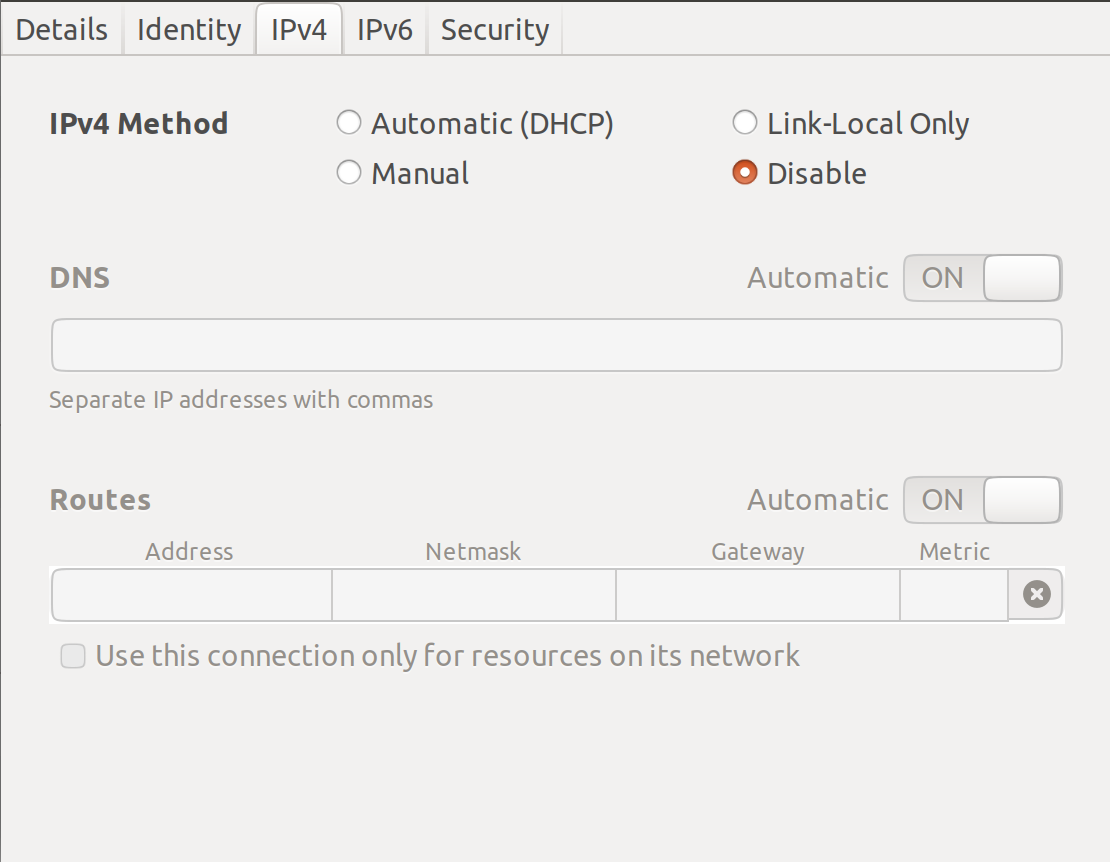
Let's not forget to disable any IP allocation on the wireless interface. Do the same for IPv6, too. All traffic must go via vSRX:
Time to bring up the VM and test:
root@vSRX> ping routing-instance INTERNET 8.8.8.8
PING 8.8.8.8 (8.8.8.8): 56 data bytes
64 bytes from 8.8.8.8: icmp_seq=0 ttl=57 time=30.447 ms
64 bytes from 8.8.8.8: icmp_seq=1 ttl=57 time=14.362 ms
64 bytes from 8.8.8.8: icmp_seq=2 ttl=57 time=15.521 ms
64 bytes from 8.8.8.8: icmp_seq=3 ttl=57 time=14.575 ms
64 bytes from 8.8.8.8: icmp_seq=4 ttl=57 time=15.369 ms
64 bytes from 8.8.8.8: icmp_seq=5 ttl=57 time=17.851 ms
^C
--- 8.8.8.8 ping statistics ---
6 packets transmitted, 6 packets received, 0% packet loss
round-trip min/avg/max/stddev = 14.362/18.021/30.447/5.671 ms
Silky smooth but does the host, my laptop, actually have internet connectivity?
Michael@schumacher:/vsrx$ ping bbc.co.uk
PING bbc.co.uk (151.101.128.81) 56(84) bytes of data.
64 bytes from 151.101.128.81 (151.101.128.81): icmp_seq=1 ttl=59 time=14.7 ms
64 bytes from 151.101.128.81 (151.101.128.81): icmp_seq=2 ttl=59 time=18.3 ms
64 bytes from 151.101.128.81 (151.101.128.81): icmp_seq=3 ttl=59 time=15.3 ms
64 bytes from 151.101.128.81 (151.101.128.81): icmp_seq=4 ttl=59 time=15.2 ms
64 bytes from 151.101.128.81 (151.101.128.81): icmp_seq=5 ttl=59 time=15.4 ms
^C
--- bbc.co.uk ping statistics ---
5 packets transmitted, 5 received, 0% packet loss, time 4002ms
rtt min/avg/max/mdev = 14.743/15.812/18.377/1.307 ms

Michael@schumacher:/vsrx$ route
Kernel IP routing table
Destination     Gateway         Genmask         Flags Metric Ref    Use Iface
default         _gateway        0.0.0.0         UG    0      0        0 tap0
10.88.88.0      0.0.0.0         255.255.255.0   U     0      0        0 tap0
link-local      0.0.0.0         255.255.0.0     U     1000   0        0 virbr0
172.17.0.0      0.0.0.0         255.255.0.0     U     0      0        0 docker0
192.168.122.0   0.0.0.0         255.255.255.0   U     0      0        0 virbr0
192.168.123.0   0.0.0.0         255.255.255.0   U     0      0        0 green_net
192.168.124.0   0.0.0.0         255.255.255.0   U     0      0        0 red_net


root@vSRX> show security flow session | match icmp
  In: 10.88.88.111/2 --> 151.101.128.81/13698;icmp, If: ge-0/0/2.0, Pkts: 1, Bytes: 84
  Out: 151.101.128.81/13698 --> 10.14.41.109/29492;icmp, If: ge-0/0/1.0, Pkts: 1, Bytes: 84
  In: 10.88.88.111/3 --> 151.101.128.81/13698;icmp, If: ge-0/0/2.0, Pkts: 1, Bytes: 84
  Out: 151.101.128.81/13698 --> 10.14.41.109/22708;icmp, If: ge-0/0/1.0, Pkts: 1, Bytes: 84
Job done!
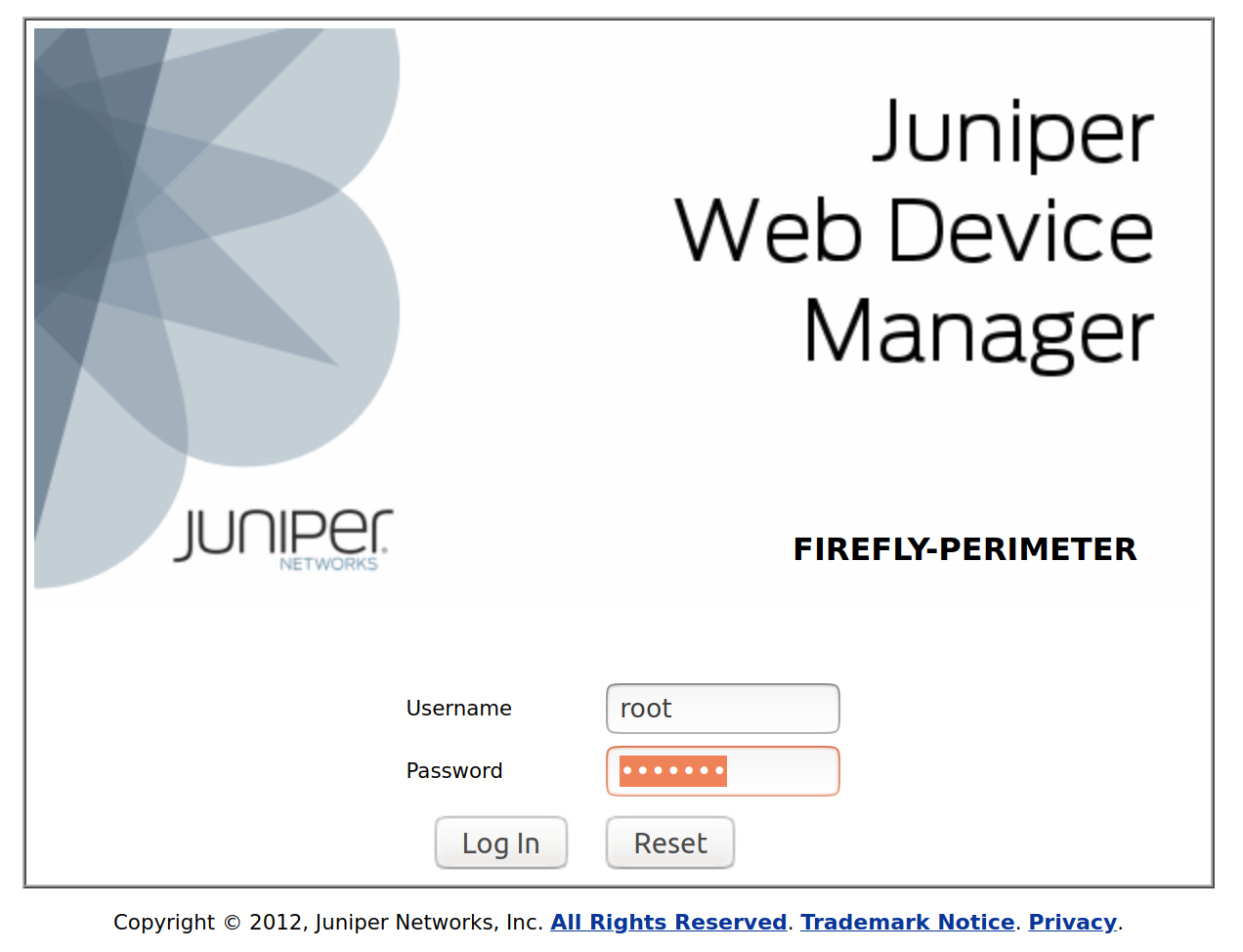
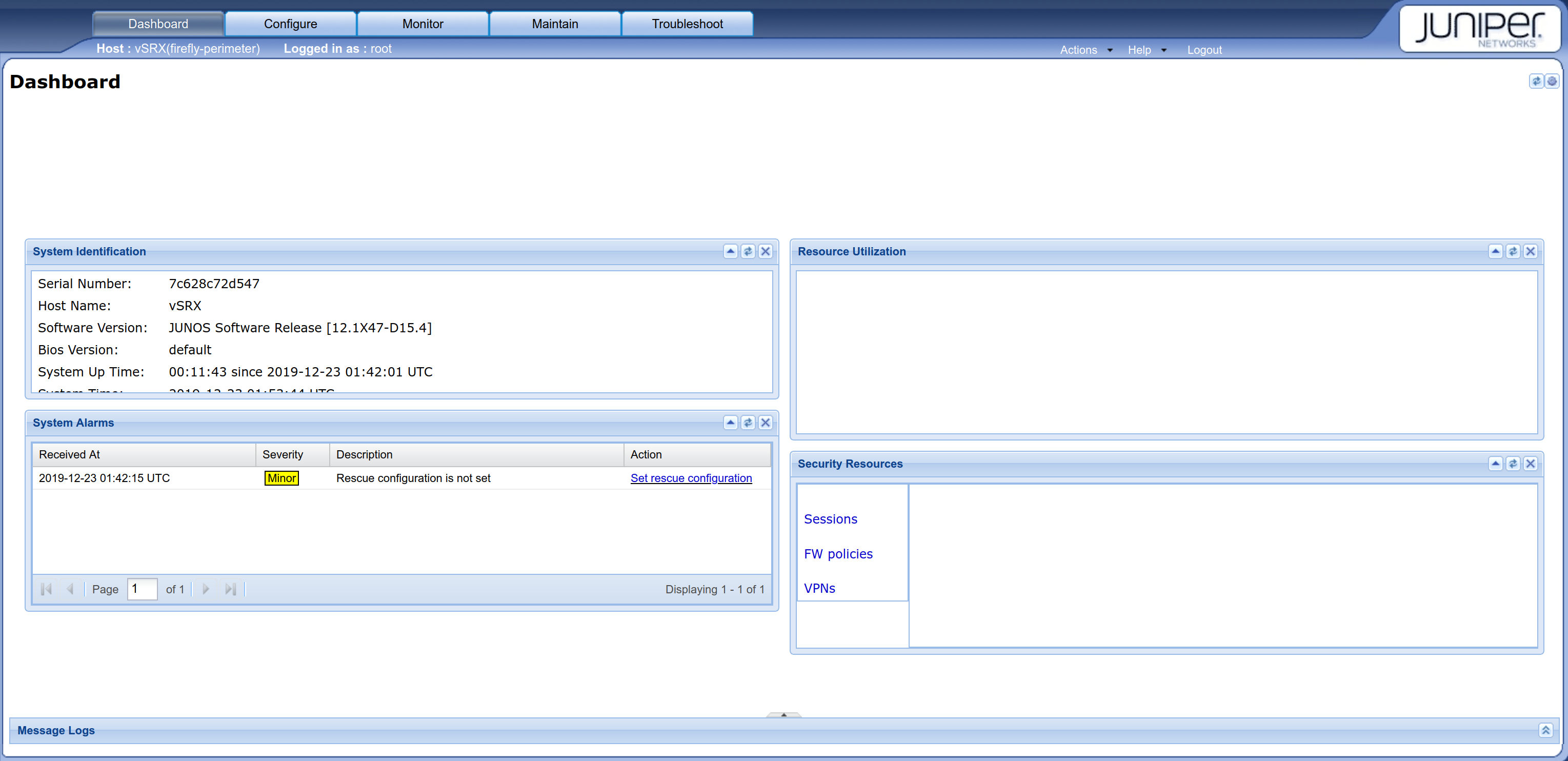
If you prefer, you could manage the firewall from the web interface, jweb, too:
Login with root / Juniper:
Problems? Just 'vagrant destroy' and start again. Other things to consider? Do you really need to keep UFW running? :)
]]>
Pseudowire Headend Termination - PART2Michael Bowenhttps://blog.msbnet.co.uk/pseudowire-headend-termination-part2/2020-11-14T18:27:29+00:00
As network engineers, I think it's fair to say we like to try and spend our time making a difference?
Despite being considered the 'bread and butter' of the Service Provider world, provisioning and decommissioning are two areas that can still demand our attention. More specifically:
Connecting subscribers from remote POPs or external access providers.
Applying the necessary limiters to sub-rate services.
Upgrading or downgrading subscriber services.
VLAN and/or IP allocation... spreadsheets!
"Isn't this what network engineers do, though, Michael?"
Is your home fitted with taps?
Imagine, if, several times a day, you were asked to go and draw water from the well, as a matter of urgency. Dumbfounded, you would probably find yourself pointing at the sink whilst mouthing the words, "Taps... but we have taps?" Just me, perhaps.
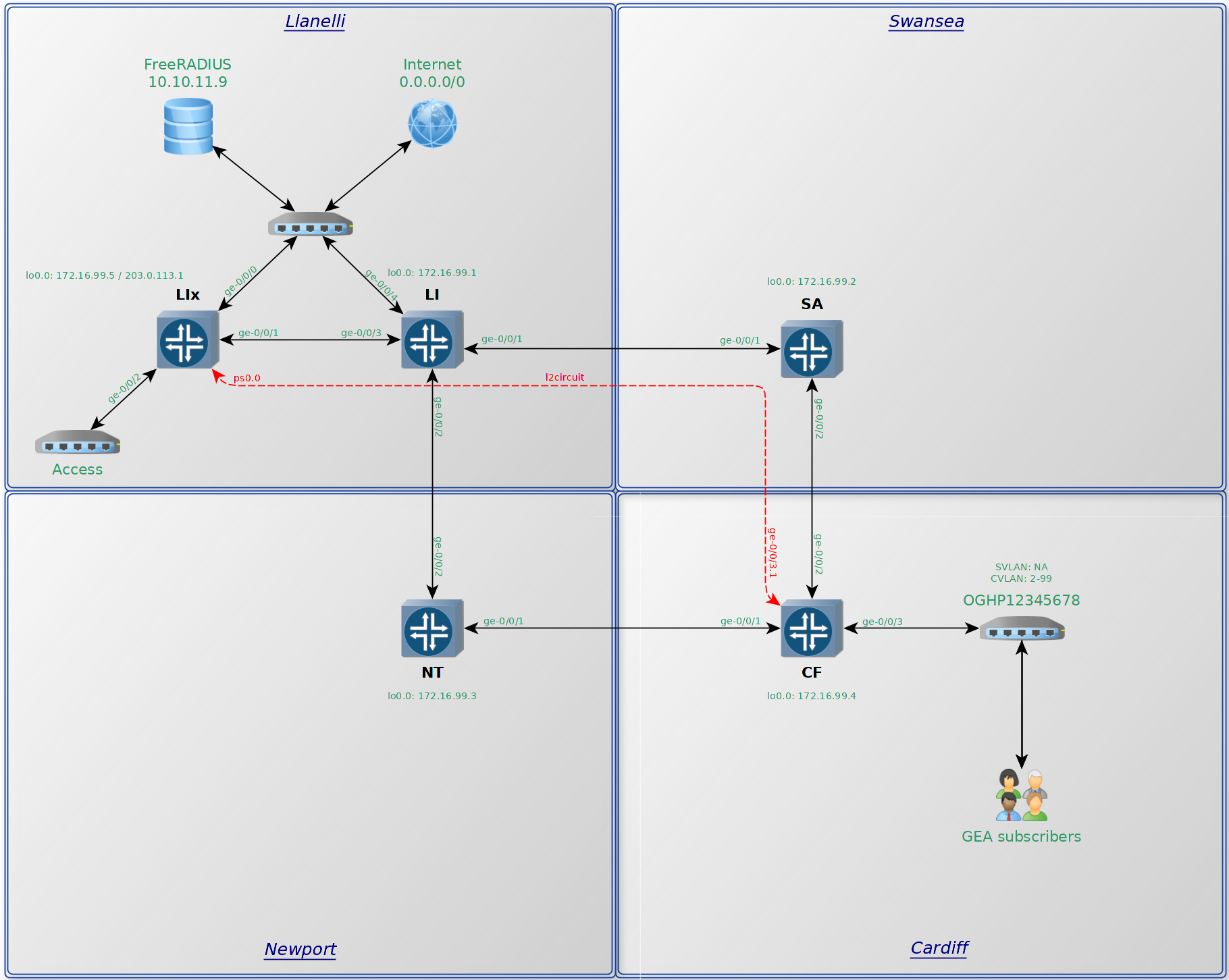
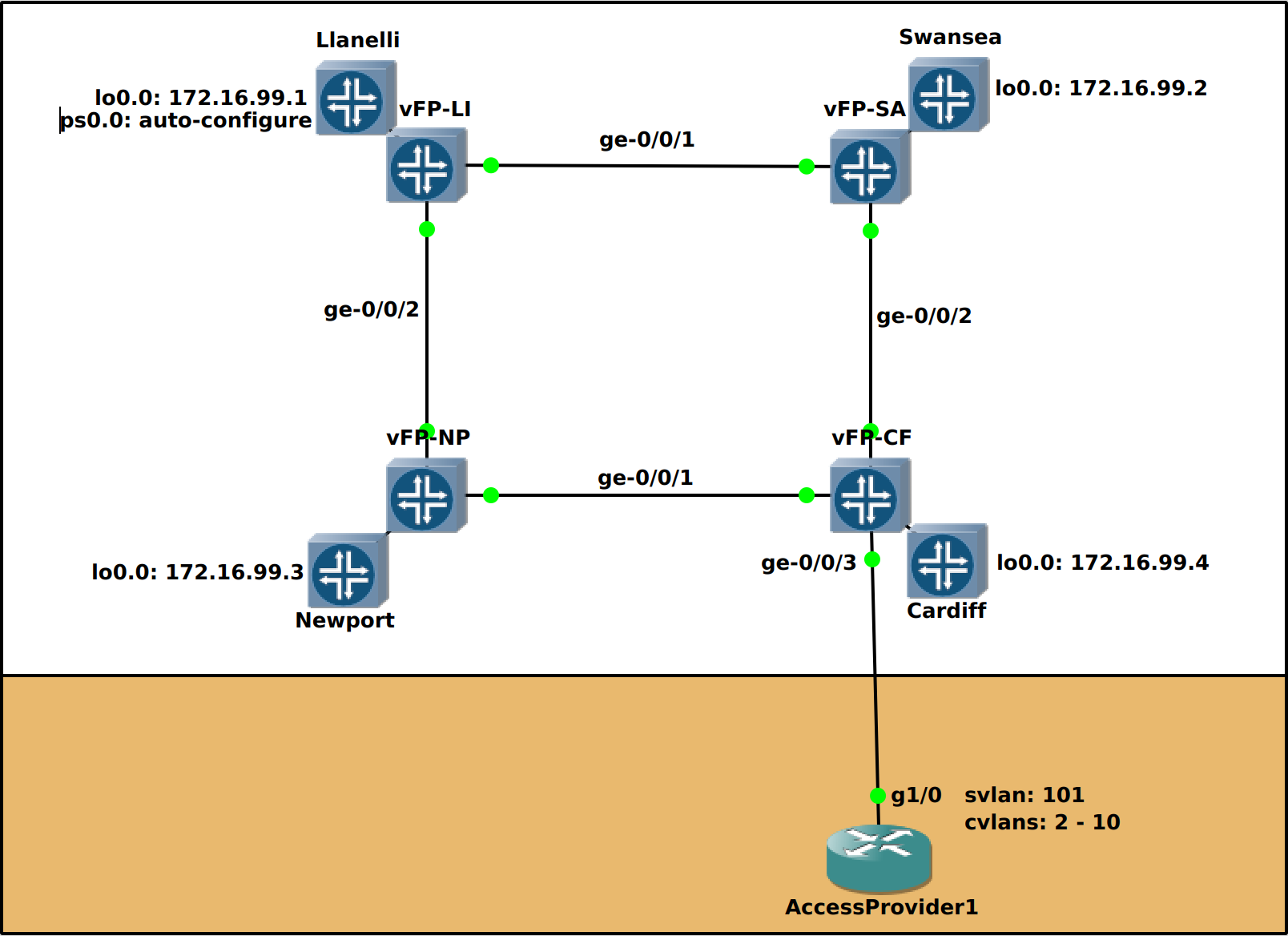
The lab has changed slightly from the previous article. We are now up to 5 vMX routers. The latest addition, LIx, based at the Llanelli site, is now the BNG:
GOAL: Modify the network so as to allow our colleagues in the Provisioning or Customer Service departments to be able to help the customer directly. This allows us to focus on support exceptions, research or revenue generating opportunities.
"If a human operator needs to touch your system during normal operations, you have a bug." Carla Geisser, Google SRE
In this example, I've simulated attaching a BT GEA cablelink circuit (single tagged) to the network. These are used to connect GEA FTTC/FTTP subscribers via Openreach's access network. What's the minimum required effort to successfully provision and decommission any associated IPoE subscribers?
The final two steps include RADIUS and a beefed up dynamic profile on the BNG, LIx.
The RADIUS config:
set access radius-server 10.10.11.9 secret "$9$YQ4JUqmT/CujHCuO1yrYgoJjH"
set access radius-server 10.10.11.9 timeout 6
set access radius-server 10.10.11.9 retry 5
set access radius-server 10.10.11.9 max-outstanding-requests 1000

set access profile ACCESS1 authentication-order radius
set access profile ACCESS1 radius authentication-server 10.10.11.9
set access profile ACCESS1 radius accounting-server 10.10.11.9
set access profile ACCESS1 radius options nas-identifier LIx
set access profile ACCESS1 accounting order radius
set access profile ACCESS1 accounting accounting-stop-on-failure
set access profile ACCESS1 accounting accounting-stop-on-access-deny
set access profile ACCESS1 accounting immediate-update
set access profile ACCESS1 accounting coa-immediate-update
set access profile ACCESS1 accounting address-change-immediate-update
set access profile ACCESS1 accounting update-interval 60
set access profile ACCESS1 accounting statistics volume-time

set access-profile ACCESS1
The dynamic 'client' profile to instantiate the logical interface:
set dynamic-profiles VLAN-BASIC interfaces "$junos-interface-ifd-name" unit "$junos-interface-unit" no-traps
set dynamic-profiles VLAN-BASIC interfaces "$junos-interface-ifd-name" unit "$junos-interface-unit" proxy-arp restricted
set dynamic-profiles VLAN-BASIC interfaces "$junos-interface-ifd-name" unit "$junos-interface-unit" vlan-tags outer "$junos-stacked-vlan-id"
set dynamic-profiles VLAN-BASIC interfaces "$junos-interface-ifd-name" unit "$junos-interface-unit" vlan-tags inner "$junos-vlan-id"
set dynamic-profiles VLAN-BASIC interfaces "$junos-interface-ifd-name" unit "$junos-interface-unit" family inet unnumbered-address lo0.0
set dynamic-profiles VLAN-BASIC interfaces "$junos-interface-ifd-name" unit "$junos-interface-unit" family inet unnumbered-address preferred-source-address 203.0.113.1
The dynamic 'service' profile for the goodies. This is where we'll dynamically shape the downstream, police the upstream and classify EF traffic from the subscriber. This could be targeted at gamers or voip users:
set dynamic-profiles EAD-PROFILE variables DNSTREAM default-value 10m
set dynamic-profiles EAD-PROFILE variables UPSTREAM default-value 2m
set dynamic-profiles EAD-PROFILE variables UPSTREAM uid
set dynamic-profiles EAD-PROFILE variables POLICER default-value policerv4
set dynamic-profiles EAD-PROFILE variables POLICER uid
set dynamic-profiles EAD-PROFILE variables IFILTER default-value ifilterv4
set dynamic-profiles EAD-PROFILE variables IFILTER uid
set dynamic-profiles EAD-PROFILE variables OFILTER default-value ofilterv4
set dynamic-profiles EAD-PROFILE variables OFILTER uid
set dynamic-profiles EAD-PROFILE interfaces "$junos-interface-ifd-name" unit "$junos-underlying-interface-unit" family inet filter input "$IFILTER"
set dynamic-profiles EAD-PROFILE interfaces "$junos-interface-ifd-name" unit "$junos-underlying-interface-unit" family inet filter output "$OFILTER"
set dynamic-profiles EAD-PROFILE class-of-service traffic-control-profiles SHAPER scheduler-map SMAP_BE_EF
set dynamic-profiles EAD-PROFILE class-of-service traffic-control-profiles SHAPER shaping-rate "$DNSTREAM"
set dynamic-profiles EAD-PROFILE class-of-service traffic-control-profiles SHAPER overhead-accounting frame-mode
set dynamic-profiles EAD-PROFILE class-of-service traffic-control-profiles SHAPER overhead-accounting bytes -4
set dynamic-profiles EAD-PROFILE class-of-service interfaces "$junos-interface-ifd-name" unit "$junos-underlying-interface-unit" output-traffic-control-profile SHAPER
set dynamic-profiles EAD-PROFILE class-of-service interfaces "$junos-interface-ifd-name" unit "$junos-underlying-interface-unit" classifiers dscp EAD_CLASSIFIER
set dynamic-profiles EAD-PROFILE class-of-service scheduler-maps SMAP_BE_EF forwarding-class BE scheduler BE_SCH
set dynamic-profiles EAD-PROFILE class-of-service scheduler-maps SMAP_BE_EF forwarding-class EF scheduler EF_SCH
set dynamic-profiles EAD-PROFILE class-of-service schedulers BE_SCH transmit-rate remainder
set dynamic-profiles EAD-PROFILE class-of-service schedulers BE_SCH priority low
set dynamic-profiles EAD-PROFILE class-of-service schedulers EF_SCH transmit-rate 128k
set dynamic-profiles EAD-PROFILE class-of-service schedulers EF_SCH transmit-rate rate-limit
set dynamic-profiles EAD-PROFILE class-of-service schedulers EF_SCH priority strict-high
set dynamic-profiles EAD-PROFILE firewall family inet filter "$IFILTER" interface-specific
set dynamic-profiles EAD-PROFILE firewall family inet filter "$IFILTER" term term1 then policer "$POLICER"
set dynamic-profiles EAD-PROFILE firewall family inet filter "$IFILTER" term term1 then service-accounting
set dynamic-profiles EAD-PROFILE firewall family inet filter "$IFILTER" term rest then accept
set dynamic-profiles EAD-PROFILE firewall family inet filter "$OFILTER" interface-specific
set dynamic-profiles EAD-PROFILE firewall family inet filter "$OFILTER" term term1 then service-accounting
set dynamic-profiles EAD-PROFILE firewall family inet filter "$OFILTER" term rest then accept
set dynamic-profiles EAD-PROFILE firewall policer "$POLICER" if-exceeding bandwidth-limit "$UPSTREAM"
set dynamic-profiles EAD-PROFILE firewall policer "$POLICER" if-exceeding burst-size-limit 15k
set dynamic-profiles EAD-PROFILE firewall policer "$POLICER" then discard
We'll also need a sprinkle of CoS:
set class-of-service forwarding-classes class BE queue-num 0
set class-of-service forwarding-classes class BE priority low
set class-of-service forwarding-classes class AF queue-num 1
set class-of-service forwarding-classes class AF priority low
set class-of-service forwarding-classes class EF queue-num 2
set class-of-service forwarding-classes class EF priority high
set class-of-service forwarding-classes class NC queue-num 3
set class-of-service forwarding-classes class NC priority high

set class-of-service classifiers dscp EAD_CLASSIFIER forwarding-class BE loss-priority high code-points be
set class-of-service classifiers dscp EAD_CLASSIFIER forwarding-class EF loss-priority low code-points ef
Some final tweaks to the DHCP server config. Here we include a pre-defined prefix for the username (the cablelink ID) as well as the interface name which allows us to build a unique, dynamic, username. The reauthenticate lease-renewal cvar is particularly useful for what comes next in our FreeRADIUS setup:
set system services dhcp-local-server group ps0 authentication password Juniper1
set system services dhcp-local-server group ps0 authentication username-include user-prefix OGHP12345678
set system services dhcp-local-server group ps0 authentication username-include interface-name
set system services dhcp-local-server group ps0 interface ps0.0
set system services dhcp-local-server group ps0 reauthenticate lease-renewal
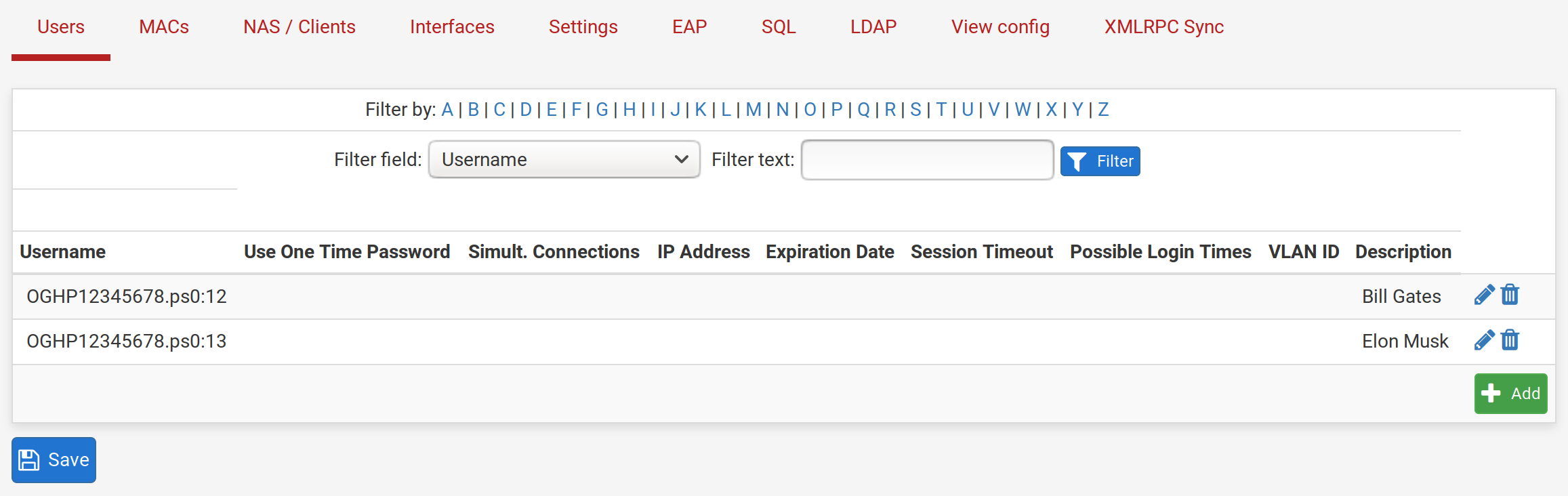
When we hope to empower our non-technical colleagues, it becomes necessary to disambiguate. Finding some sort of frontend to your RADIUS solution may be key. In this instance, I'm using FreeRADIUS on top of pfSense.
This is the point where you can probably handover to another department to populate the usernames:
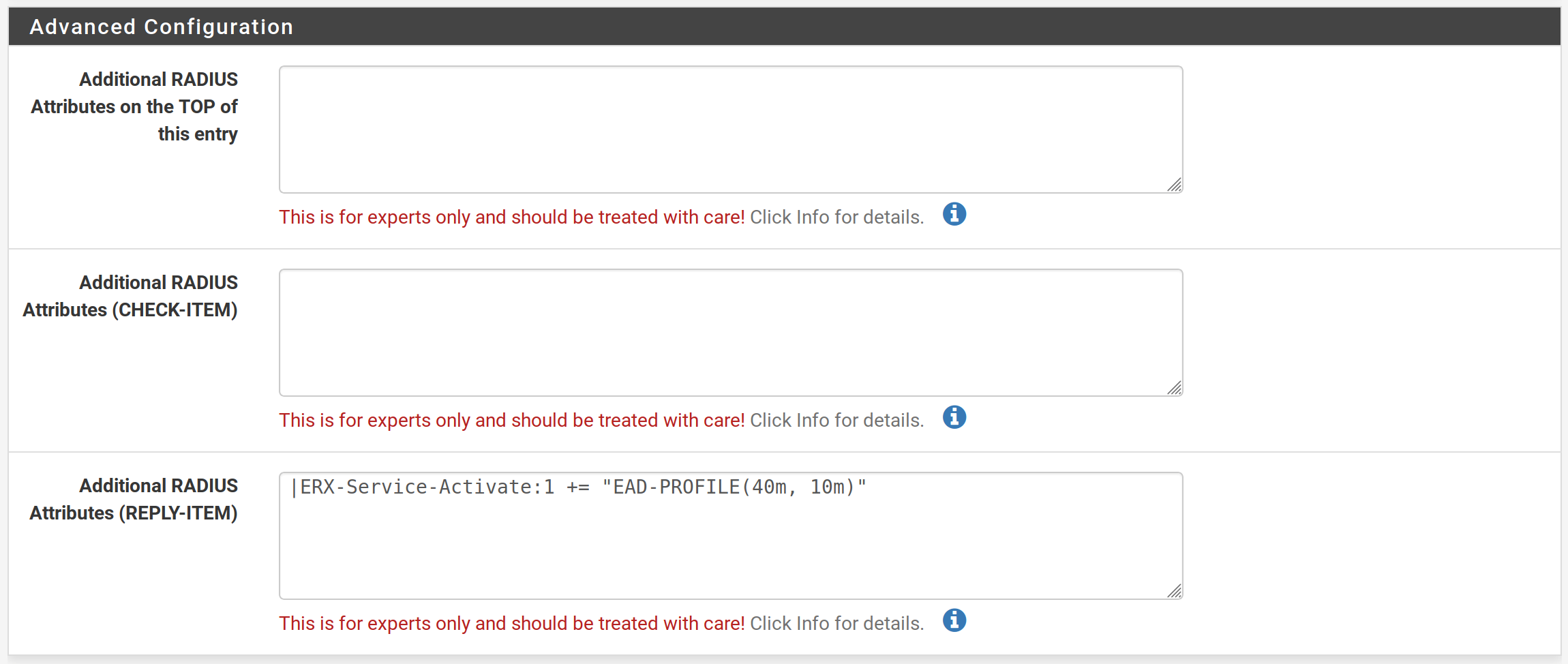
If we double click on Elon's username we are presented with a myriad of options. Scroll all the way down and you'll see something like this:
That final box is all we really need. It took some time to get the dynamic profile set up just so but from here, the customer 'service profile' can be configured by any of your non-technical colleagues. Initially, it might have been set to |ERX-Service-Activate:1 += "EAD-PROFILE(40m, 10m)" which simply denotes a 40Mb/s downstream speed and a 10Mb/s upstream speed. If the customer calls up wanting to be upgraded to an 80/20 service, a quick edit in that box |ERX-Service-Activate:1 += "EAD-PROFILE(80m, 20m)" will automatically see the customer's speed updated shortly after.
No need to ask them to power cycle kit and risk them breaking something and causing more calls / truck rolls. When the DHCP lease expires, the dynamic profile will check back here for any updates. What's the lease expiry in our IPv4 exhausted world? Typically 1 - 4 hours but it can be whatever you want.
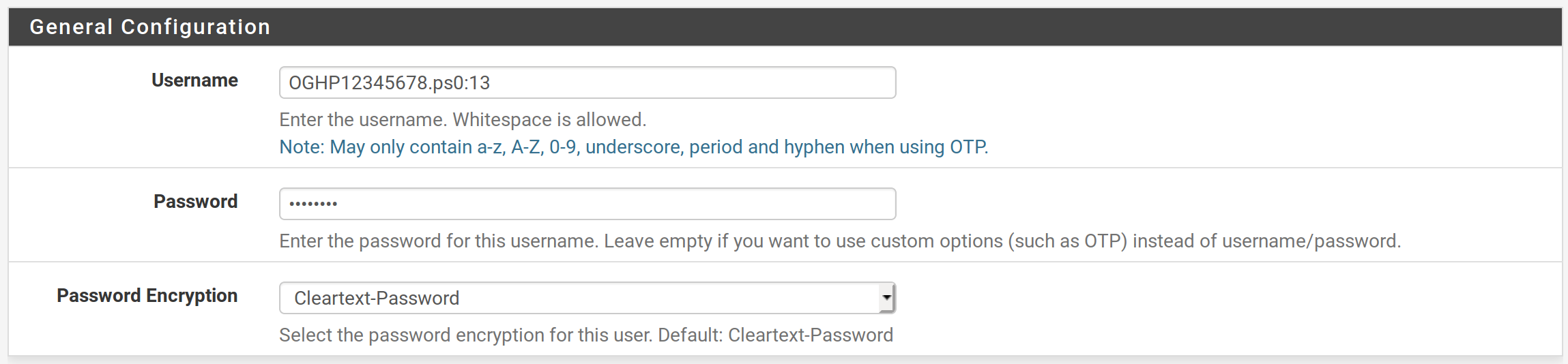
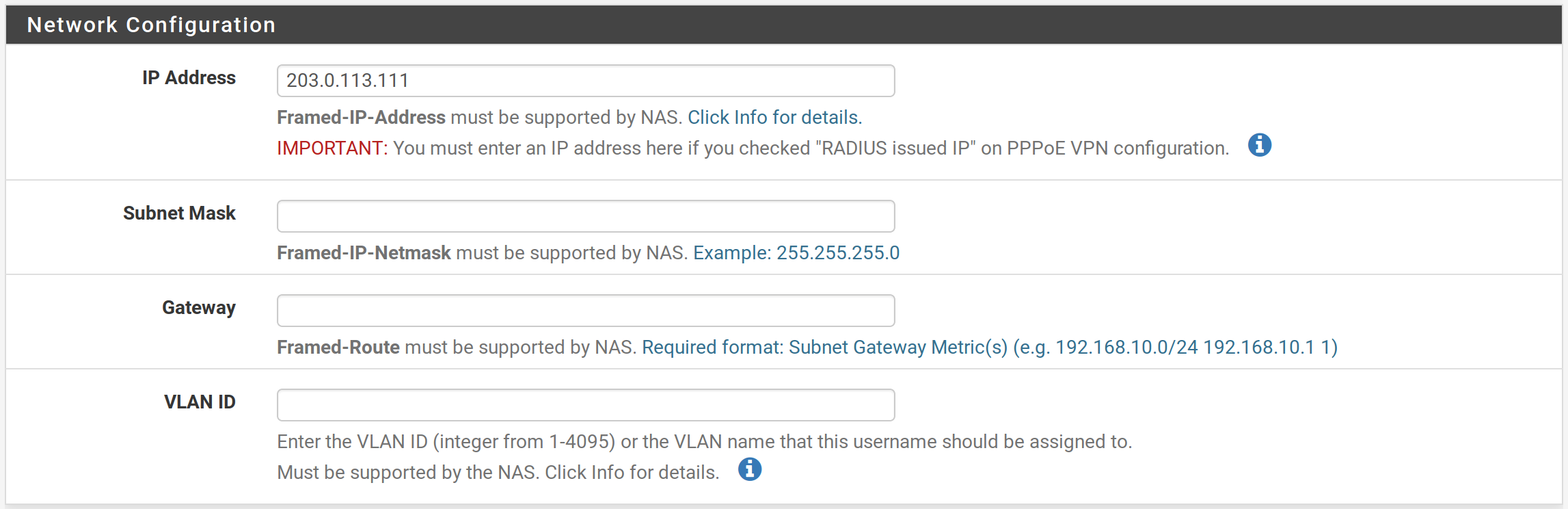
Want to disconnect a user for non-payment? Simply change their RADIUS password:
Want to issue a static IP? Just pop one in this box:
root@LIx> show subscribers
Interface             IP Address/VLAN ID                      User Name                      LS:RI
ps0.3221225476         13                                                               default:default
ps0.3221225476        203.0.113.111                           OGHP12345678.ps0:13       default:default
If, for some reason, you want to login to the router, there are a few commands you can issue to check all is well:
root@LIx> show class-of-service scheduler-map SMAP_BE_EF_UID1016
Scheduler map: SMAP_BE_EF_UID1016, Index: 4294967357

  Scheduler: BE_SCH_UID1014, Forwarding class: BE, Index: 4294967360
    Transmit rate: remainder, Rate Limit: none, Buffer size: remainder, Buffer Limit: none, Priority: low
    Excess Priority: unspecified
    Drop profiles:
      Loss priority   Protocol    Index    Name
      Low             any             1    <default-drop-profile>
      Medium low      any             1    <default-drop-profile>
      Medium high     any             1    <default-drop-profile>
      High            any             1    <default-drop-profile>

  Scheduler: EF_SCH_UID1015, Forwarding class: EF, Index: 4294967361
    Transmit rate: 128000 bps, Rate Limit: rate-limit, Buffer size: remainder, Buffer Limit: none, Priority: strict-high
    Excess Priority: unspecified
    Drop profiles:
      Loss priority   Protocol    Index    Name
      Low             any             1    <default-drop-profile>
      Medium low      any             1    <default-drop-profile>
      Medium high     any             1    <default-drop-profile>
      High            any             1    <default-drop-profile>
Check the policer and accounting stats:
root@LIx> show firewall

Filter: __default_bpdu_filter__

Filter: ifilterv4_UID1019-ps0.3221225476-in
Counters:
Name                                                Bytes              Packets
__junos-dyn-service-counter                      29317545               138097
Policers:
Name                                                Bytes              Packets
policerv4_UID1018-term1-ps0.3221225476-in              1506492                 1015

Filter: ofilterv4_UID1020-ps0.3221225476-out
Counters:
Name                                                Bytes              Packets
__junos-dyn-service-counter                      80939623                99292
Check if the subscriber is making use of the QoS in the dynamic profile?
As always, there is so much more that can be done but hopefully I've provided the foundations from which you can try and seize more control of your working day whilst providing a high quality and consistent experience to your paying customers.
]]>
Pseudowire Headend Termination - in 8 steps - PART1Michael Bowenhttps://blog.msbnet.co.uk/pseudowire-headend-termination-in-8-steps-part1/2020-11-14T18:27:39+00:00PROBLEM: Swansea, Newport and Cardiff subscribers have been, temporarily, terminated on vACX hardware at those sites. The vACX routers are typically used for mobile backhaul and generally don't have the 'grunt' to terminate subscribers. They don't support per-unit-scheduling, for example. We need to get them off these routers.
GOAL: Terminate all subscribers from the Access Provider at Cardiff, on to the new vMX960 at Llanelli.
Let's log on to Llanelli and get cracking! Before we begin, let's check reachability to the loopbacks:
root@Llanelli> ping 172.16.99.1 count 1
PING 172.16.99.1 (172.16.99.1): 56 data bytes
64 bytes from 172.16.99.1: icmp_seq=0 ttl=64 time=0.066 ms

--- 172.16.99.1 ping statistics ---
1 packets transmitted, 1 packets received, 0% packet loss
round-trip min/avg/max/stddev = 0.066/0.066/0.066/0.000 ms

root@Llanelli> ping 172.16.99.2 count 1
PING 172.16.99.2 (172.16.99.2): 56 data bytes
64 bytes from 172.16.99.2: icmp_seq=0 ttl=64 time=93.739 ms

--- 172.16.99.2 ping statistics ---
1 packets transmitted, 1 packets received, 0% packet loss
round-trip min/avg/max/stddev = 93.739/93.739/93.739/0.000 ms

root@Llanelli> ping 172.16.99.3 count 1
PING 172.16.99.3 (172.16.99.3): 56 data bytes
64 bytes from 172.16.99.3: icmp_seq=0 ttl=64 time=21.710 ms

--- 172.16.99.3 ping statistics ---
1 packets transmitted, 1 packets received, 0% packet loss
round-trip min/avg/max/stddev = 21.710/21.710/21.710/0.000 ms

root@Llanelli> ping 172.16.99.4 count 1
PING 172.16.99.4 (172.16.99.4): 56 data bytes
64 bytes from 172.16.99.4: icmp_seq=0 ttl=63 time=281.251 ms

--- 172.16.99.4 ping statistics ---
1 packets transmitted, 1 packets received, 0% packet loss
round-trip min/avg/max/stddev = 281.251/281.251/281.251/0.000 ms
Add secondary IP to lo0.0: set interfaces lo0 unit 0 family inet address 203.0.113.1/32
Configure the dynamic VLAN profile with versioning: set system dynamic-profile-options versioning set dynamic-profiles DYNINTF-DHCP-INET interfaces "$junos-interface-ifd-name" unit "$junos-interface-unit" proxy-arp restricted set dynamic-profiles DYNINTF-DHCP-INET interfaces "$junos-interface-ifd-name" unit "$junos-interface-unit" vlan-tags outer "$junos-stacked-vlan-id" set dynamic-profiles DYNINTF-DHCP-INET interfaces "$junos-interface-ifd-name" unit "$junos-interface-unit" vlan-tags inner "$junos-vlan-id" set dynamic-profiles DYNINTF-DHCP-INET interfaces "$junos-interface-ifd-name" unit "$junos-interface-unit" family inet unnumbered-address lo0.0 set dynamic-profiles DYNINTF-DHCP-INET interfaces "$junos-interface-ifd-name" unit "$junos-interface-unit" family inet unnumbered-address preferred-source-address 203.0.113.1
Enable tunnel-services on the PFE: set chassis fpc 0 pic 0 tunnel-services bandwidth 1g set chassis fpc 0 pic 0 traffic-manager egress-shaping-overhead 0 set chassis network-services enhanced-ip set chassis pseudowire-service device-count 4
Configure the pseudowire (ps0) interface for single and double tagged traffic: set interfaces ps0 anchor-point lt-0/0/10 set interfaces ps0 flexible-vlan-tagging set interfaces ps0 auto-configure stacked-vlan-ranges dynamic-profile DYNINTF-DHCP-INET accept any set interfaces ps0 auto-configure stacked-vlan-ranges dynamic-profile DYNINTF-DHCP-INET ranges any,any set interfaces ps0 auto-configure vlan-ranges dynamic-profile DYNINTF-DHCP-INET accept any set interfaces ps0 auto-configure vlan-ranges dynamic-profile DYNINTF-DHCP-INET ranges any set interfaces ps0 auto-configure remove-when-no-subscribers set interfaces ps0 no-gratuitous-arp-request set interfaces ps0 unit 0 encapsulation ethernet-ccc
Configure DHCP and bind it to the transport logical (ps0.0) interface: set system services dhcp-local-server pool-match-order ip-address-first set system services dhcp-local-server authentication username-include interface-name set system services dhcp-local-server group local interface ps0.0
Enable subscriber management: set system services subscriber-management enable set system configuration-database max-db-size 104857600
Configure the access profile and DHCP scope. Apply the access-profile: set access profile local authentication-order none set access address-assignment pool TEST-NET-3 family inet network 203.0.113.0/24 set access address-assignment pool TEST-NET-3 family inet range 1 low 203.0.113.2 set access address-assignment pool TEST-NET-3 family inet range 1 high 203.0.113.250 set access address-assignment pool TEST-NET-3 family inet dhcp-attributes maximum-lease-time 3600 set access address-assignment pool TEST-NET-3 family inet dhcp-attributes domain-name msbnet.co.uk set access address-assignment pool TEST-NET-3 family inet dhcp-attributes router 203.0.113.1 set access-profile local
Configure the l2circuit at both sites: # Llanelli set protocols l2circuit neighbor 172.16.99.4 interface ps0.0 virtual-circuit-id 1 set protocols l2circuit neighbor 172.16.99.4 interface ps0.0 ignore-mtu-mismatch # Cardiff set protocols l2circuit neighbor 172.16.99.1 interface ge-0/0/3.1 virtual-circuit-id 1 set protocols l2circuit neighbor 172.16.99.1 interface ge-0/0/3.1 encapsulation-type ethernet set protocols l2circuit neighbor 172.16.99.1 interface ge-0/0/3.1 ignore-mtu-mismatch set interfaces ge-0/0/3 unit 1 encapsulation vlan-ccc set interfaces ge-0/0/3 unit 1 vlan-id-range 2-10
Finally, commit the configuration at both sites. Llanelli displays the follow message upon commit:
root@Llanelli# commit and-quit
[edit system services subscriber-management]
  'enable'
    warning: Chassis configuration for subscriber-management has been changed. A system reboot is mandatory.  Please reboot the system NOW. Continuing without a reboot might result in unexpected system behavior.

Message from syslogd@Llanelli at Sep 20 17:18:05  ...
Llanelli fpc0 CMLC: Going disconnected; Routing engine chassis socket closed abruptly
commit complete
Exiting configuration mode
If we take a sneaky peak at the PFE directly after the commit, we see the following:
root@Llanelli> show chassis fpc
                     Temp  CPU Utilization (%)   CPU Utilization (%)  Memory    Utilization (%)
Slot State            (C)  Total  Interrupt      1min   5min   15min  DRAM (MB) Heap     Buffer
  0  Offline         ---Restarted by cli command---
  1  Empty
  2  Empty
  3  Empty
  4  Empty
  5  Empty
  6  Empty
  7  Empty
  8  Empty
  9  Empty
 10  Empty
 11  Empty
Enabling tunnel services caused the PFE to restart. It is at this point it gives birth to the logical tunnel interface, lt-0/0/10, amongst others. Periodically check the chassis to see if the PFE has come back up:
root@Llanelli> show chassis fpc
                     Temp  CPU Utilization (%)   CPU Utilization (%)  Memory    Utilization (%)
Slot State            (C)  Total  Interrupt      1min   5min   15min  DRAM (MB) Heap     Buffer
  0  Online           Testing  20         0       30     33     32    2047        7          0
  1  Empty
  2  Empty
  3  Empty
  4  Empty
  5  Empty
  6  Empty
  7  Empty
  8  Empty
  9  Empty
 10  Empty
 11  Empty
Excellent! Now reboot the routing engine as indicated after the commit:
root@Llanelli> request system reboot
Reboot the system ? [yes,no] (no) yes


*** FINAL System shutdown message from root@Llanelli ***

System going down IMMEDIATELY


Waiting (max 60 seconds) for system process `vnlru' to stop... done
Waiting (max 60 seconds) for system process `bufdaemon' to stop... done
Waiting (max 60 seconds) for system process `syncer' to stop...
Syncing disks, vnodes remaining... 0 0 0 done
All buffers synced.
Uptime: 1h4m47s
Khelp module "jsocket" can't unload until its refcount drops from 4 to 0.
Rebooting...
cpu_reset: Stopping other CPUs
Once the routing engine has come back up, it whistles to the packet forwarding engine to come hither. Once they're back in sync, we can proceed:
root@Llanelli> show chassis fpc
                     Temp  CPU Utilization (%)   CPU Utilization (%)  Memory    Utilization (%)
Slot State            (C)  Total  Interrupt      1min   5min   15min  DRAM (MB) Heap     Buffer
  0  Online           Absent   0          0        0      0      0      0         0          0
  1  Empty
  2  Empty
  3  Empty
  4  Empty
  5  Empty
  6  Empty
  7  Empty
  8  Empty
  9  Empty
 10  Empty
 11  Empty
Not yet.
root@Llanelli> show chassis fpc
                     Temp  CPU Utilization (%)   CPU Utilization (%)  Memory    Utilization (%)
Slot State            (C)  Total  Interrupt      1min   5min   15min  DRAM (MB) Heap     Buffer
  0  Online           Testing  40         0       17      4      1    2047        7          0
  1  Empty
  2  Empty
  3  Empty
  4  Empty
  5  Empty
  6  Empty
  7  Empty
  8  Empty
  9  Empty
 10  Empty
 11  Empty
Job done.
Now let's check the pseudowire has come up:
root@Llanelli> show l2circuit connections status
Layer-2 Circuit Connections:

Legend for connection status (St)
EI -- encapsulation invalid      NP -- interface h/w not present
MM -- mtu mismatch               Dn -- down
EM -- encapsulation mismatch     VC-Dn -- Virtual circuit Down
CM -- control-word mismatch      Up -- operational
VM -- vlan id mismatch           CF -- Call admission control failure
OL -- no outgoing label          IB -- TDM incompatible bitrate
NC -- intf encaps not CCC/TCC    TM -- TDM misconfiguration
BK -- Backup Connection          ST -- Standby Connection
CB -- rcvd cell-bundle size bad  SP -- Static Pseudowire
LD -- local site signaled down   RS -- remote site standby
RD -- remote site signaled down  HS -- Hot-standby Connection
XX -- unknown

Legend for interface status
Up -- operational
Dn -- down
Neighbor: 172.16.99.4
    Interface                 Type  St     Time last up          # Up trans
    ps0.0(vc 1)               rmt   Up     Sep 20 17:29:48 2019           1
      Remote PE: 172.16.99.4, Negotiated control-word: Yes (Null)
      Incoming label: 16, Outgoing label: 299872
      Negotiated PW status TLV: No
      Local interface: ps0.0, Status: Up, Encapsulation: ETHERNET
      Flow Label Transmit: No, Flow Label Receive: No
It has!
Now, let's check that our Cardiff subscribers have found their way over to us:
root@Llanelli> show subscribers
Total subscribers: 0, Active Subscribers: 0
Oh dear. What have I missed?
A quick glance at Cardiff's access port highlights the error of my ways. I've enabled the CVLANs on the pseudowire instead of the SVLAN. Easily corrected:
root@Cardiff> show configuration interfaces ge-0/0/3 | display set
set interfaces ge-0/0/3 description "Access Provider 1"
set interfaces ge-0/0/3 flexible-vlan-tagging
set interfaces ge-0/0/3 encapsulation flexible-ethernet-services
set interfaces ge-0/0/3 unit 1 encapsulation vlan-ccc
set interfaces ge-0/0/3 unit 1 vlan-id-range 2-10	<--------- CVLANs


root@Cardiff> edit
Entering configuration mode
root@Cardiff# set interfaces ge-0/0/3 unit 1 vlan-id 101
root@Cardiff# commit and-quit
commit complete
Exiting configuration mode
]]>
VLAN-Based Layer 2 Circuits with EoMPLS and l2circuitMichael Bowenhttps://blog.msbnet.co.uk/vlan-based-layer-2-circuits-with-eompls-and-l2circuit/2020-11-14T18:27:46+00:00
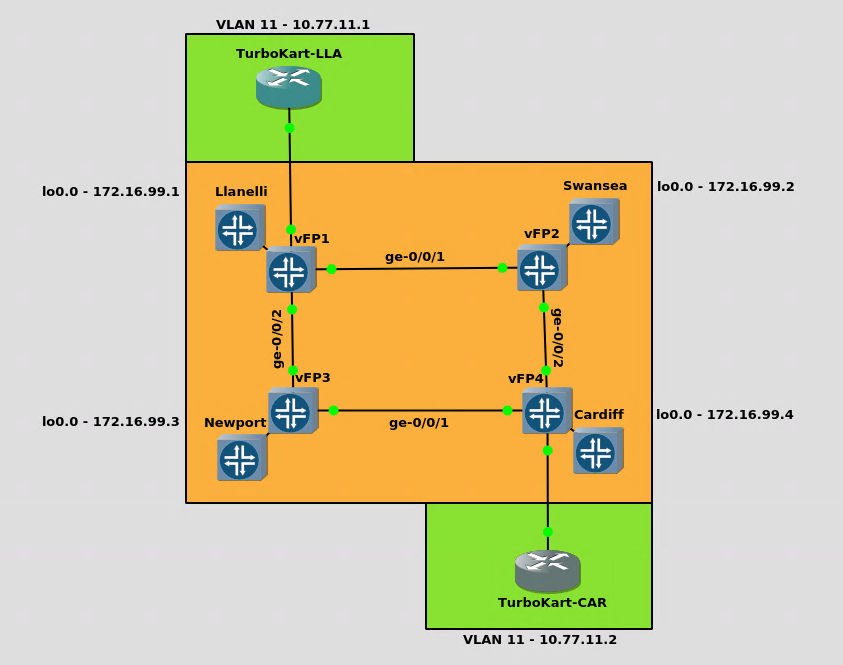
I was recently asked to set up a LAN extension for a customer. After a spot of research, I was very impressed by this particular method which I've illustrated below.
Based on IETF RFC 4447(Pseudowire Setup and Maintenance Using the Label Distribution Protocol).
Layer 2 services (such as Frame Relay, Asynchronous Transfer Mode, and Ethernet) can be "emulated" over an MPLS backbone by encapsulating the Layer 2 Protocol Data Units (PDU) and transmitting them over "pseudowires".
The service provider network is coloured orange and represents four towns/cities. The customer network is coloured green with one site in Llanelli and one in Cardiff.
Goal Extend the 10.77.11.0/24 network from Llanelli to Cardiff.
The end result should look like this when pinging the Llanelli site from Cardiff:
TurboKart-LLA#show ip int br
Interface                  IP-Address      OK? Method Status                Protocol
FastEthernet0/0            unassigned      YES NVRAM  administratively down down
GigabitEthernet1/0         unassigned      YES NVRAM  up                    up
GigabitEthernet1/0.11      10.77.11.1      YES NVRAM  up                    up
GigabitEthernet2/0         unassigned      YES NVRAM  administratively down down
GigabitEthernet3/0         unassigned      YES NVRAM  administratively down down
GigabitEthernet4/0         unassigned      YES NVRAM  administratively down down

TurboKart-LLA#ping 10.77.11.2
Type escape sequence to abort.
Sending 5, 100-byte ICMP Echos to 10.77.11.2, timeout is 2 seconds:
!!!!!
Success rate is 100 percent (5/5), round-trip min/avg/max = 48/594/1012 ms
I'm using vMX 18.2R1.9 for the service provider network. You can get a free trial from Juniper's website. The customer network employs version 15.2 of the trusty C7200-ADVENTERPRISEK9-M.
Configuring the service provider network vMX is a hungry beast, requiring 2GB of RAM for the virtual control plane and 4GB for the virtual forwarding plane so, first things first, we'll configure the FPC for lite-mode. This reduces the requirement to 1GB and 2GB, respectively:
set chassis fpc 0 lite-mode
Next, pop an address on the loopback and then IP the core facing interfaces. Nothing fancy here. Enable the MPLS family on each interface, too:
set interfaces lo0 unit 0 family inet address 172.16.99.1/32
set interfaces lo0 unit 0 family mpls

set interfaces ge-0/0/1 unit 0 family inet address 10.10.1.1/24
set interfaces ge-0/0/1 unit 0 family mpls

set interfaces ge-0/0/2 unit 0 family inet address 10.10.2.1/24
set interfaces ge-0/0/2 unit 0 family mpls
Next, enable OSPF, LDP and MPLS under the protocols stanza:
set protocols mpls interface lo0.0
set protocols mpls interface ge-0/0/1.0
set protocols mpls interface ge-0/0/2.0

set protocols ospf area 0.0.0.0 interface lo0.0 passive
set protocols ospf area 0.0.0.0 interface ge-0/0/1.0
set protocols ospf area 0.0.0.0 interface ge-0/0/2.0

set protocols ldp interface ge-0/0/1.0
set protocols ldp interface ge-0/0/2.0
set protocols ldp interface lo0.0
That's the core configuration wrapped up. Repeat for all four routers, tweaking the IPs.
Configuring the access ports For the customer-specific configuration, we'll need to configure an access port at each BT exchange (Llanelli and Cardiff) and a pseudowire (l2circuit) to transport the contents of that access port/VLAN to the other site. In this instance, we transport seven VLANs; 10 - 16. The following additional config is required:
Llanelli Exchange
set interfaces ge-0/0/3 description "Access port"
set interfaces ge-0/0/3 flexible-vlan-tagging
set interfaces ge-0/0/3 encapsulation flexible-ethernet-services
set interfaces ge-0/0/3 unit 1000 description "TurboKart - Llanelli"
set interfaces ge-0/0/3 unit 1000 encapsulation vlan-ccc
set interfaces ge-0/0/3 unit 1000 vlan-id-range 10-16

set protocols l2circuit neighbor 172.16.99.4 interface ge-0/0/3.1000 virtual-circuit-id 1000
set protocols l2circuit neighbor 172.16.99.4 interface ge-0/0/3.1000 encapsulation-type ethernet
set protocols l2circuit neighbor 172.16.99.4 interface ge-0/0/3.1000 ignore-mtu-mismatch
Cardiff Exchange
set interfaces ge-0/0/3 description "Access port"
set interfaces ge-0/0/3 flexible-vlan-tagging
set interfaces ge-0/0/3 encapsulation flexible-ethernet-services
set interfaces ge-0/0/3 unit 1000 description "TurboKart - Cardiff"
set interfaces ge-0/0/3 unit 1000 encapsulation vlan-ccc
set interfaces ge-0/0/3 unit 1000 vlan-id-range 10-16

set protocols l2circuit neighbor 172.16.99.1 interface ge-0/0/3.1000 virtual-circuit-id 1000
set protocols l2circuit neighbor 172.16.99.1 interface ge-0/0/3.1000 encapsulation-type ethernet
set protocols l2circuit neighbor 172.16.99.1 interface ge-0/0/3.1000 ignore-mtu-mismatch
All done, time to test. Let's ping our fictitious customer's Llanelli site from VLAN 11 at Cardiff:
TurboKart-CAR#show ip int br
Interface                  IP-Address      OK? Method Status                Protocol
FastEthernet0/0            unassigned      YES NVRAM  administratively down down
GigabitEthernet1/0         unassigned      YES NVRAM  up                    up
GigabitEthernet1/0.11      10.77.11.2      YES NVRAM  up                    up
GigabitEthernet2/0         unassigned      YES NVRAM  administratively down down
GigabitEthernet3/0         unassigned      YES NVRAM  administratively down down
GigabitEthernet4/0         unassigned      YES NVRAM  administratively down down

TurboKart-CAR#sh run int g1/0.11
Building configuration...

Current configuration : 100 bytes
!
interface GigabitEthernet1/0.11
 encapsulation dot1Q 11
 ip address 10.77.11.2 255.255.255.0
end

TurboKart-CAR#ping 10.77.11.1
Type escape sequence to abort.
Sending 5, 100-byte ICMP Echos to 10.77.11.1, timeout is 2 seconds:
!!!!!
Success rate is 100 percent (5/5), round-trip min/avg/max = 544/816/1676 ms
Job done!
There's lots more we could do here to compliment this setup so stay tuned :)